
Keeping track of family members can make everyday life easier. Parents want to know when their children arrive at school. Families may need to coordinate pickups, manage busy schedules, or check in during a trip. A reliable family tracking app can help with these tasks.
However, not every app offers the same features. Some focus on GPS location and safe-place alerts. Others provide screen time controls, website filtering,call, messages, social media monitoring, and tools to help parents understand their children’s online activities.
The best choice depends on your family, your devices, and the level of supervision you need.
In this guide, we explore the best family tracking apps for Android and iPhone, including FonSee, Life360, TheOneSpy, OgyMogy, Bark, Qustodio, and Norton Family. We explain their main features, their strengths, and what to consider before choosing one.
What Is a Family Tracking App?
A family tracking app helps family members stay connected and share useful information. Depending on the app, this may include location updates, location history, arrival alerts, screen time reports, or parental controls.
A basic locator helps answer one question: Where is the family member’s phone?
The best parental control apps can do more. It may help parents manage app use, set web restrictions, review activity reports, and establish healthier phone habits.
These tools serve different purposes. A location-sharing app may be enough for a family with older teenagers. Parents of younger children may prefer additional controls.
Before installing any tracking app, check its compatibility with your phone. Android and iOS have different restrictions. Features available on one platform may not work the same way on the other.
Best Family Safety Apps for Android & iPhone
FonSee
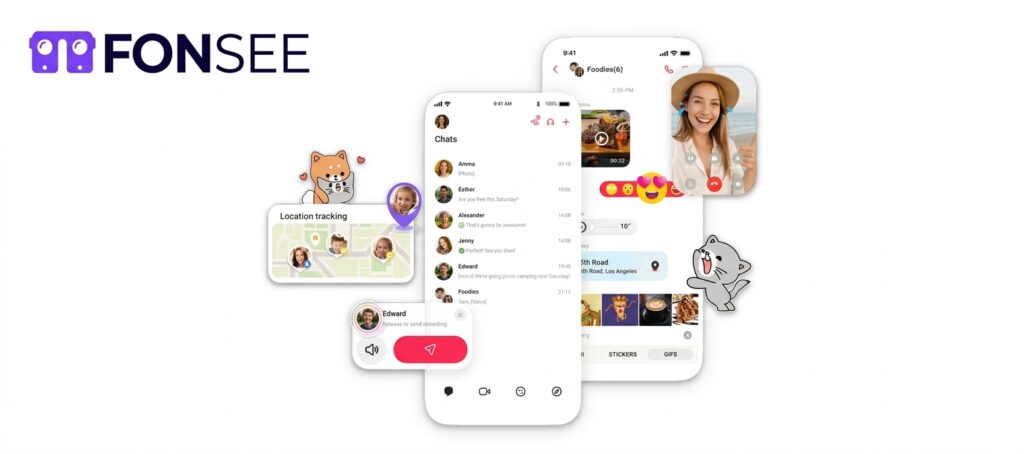
FonSee is best option for parents who want location tracking and parental control features in one dashboard. It combines tools for understanding phone activity with features that help families manage digital routines.
Its location features include GPS tracking, available location history, geofencing, and place-based alerts. These can help parents coordinate school pickups, check agreed travel plans, and understand when a child’s phone reaches a familiar location.
FonSee also includes tools for reviewing supported messages, calls, social app activity, browsing history, and app usage. Parents can use this information to identify patterns and start conversations about online safety.
For example, if a child spends more time on a particular app than expected, a parent can discuss how it fits into the child’s daily routine. App and website controls may also help families set boundaries around homework and bedtime.
Key features
- GPS location tracking and location history
- Geofencing and available alerts
- Supported call, message, and social app activity
- Browsing history and app usage information
- App and website restrictions on supported devices
Best for: Parents who want location features alongside tools for managing their children’s digital habits.
What to consider: Check the supported device, Android version, plan, and setup requirements. FonSee’s feature availability is not identical across Android and iPhone. Confirm the current compatibility details before buying.
Life360
Life360 is one of the best-known options for families who mainly want location sharing and everyday coordination. It is designed around keeping family members connected through a shared location experience.
Family members can use the app to view available location updates and set up place notifications. Depending on the plan, region, and device, Life360 may also offer driving-related features and safety tools.
This can be useful for families with teenagers who travel to school, attend sports practice, or drive independently. Instead of sending repeated messages asking everyone to confirm their arrival, family members can use shared location information and agreed place alerts.
Life360 is also useful for coordinating with other relatives. A household can use it to manage everyday check-ins without needing a more extensive phone monitoring solution.
Key features
- Family location sharing
- Place-based arrival and departure notifications
- Location history, subject to plan availability
- Driving and safety features on supported plans
- Family coordination tools
Best for: Families who want straightforward location sharing and useful safety features.
What to consider: Life360 is primarily a family locator and safety platform, not a complete replacement for a parental control app. Compare its current plans, location-sharing settings, and privacy policy before signing up.
Location updates can also be delayed by poor connectivity, disabled location services, or a phone with a low battery. Always check the timestamp rather than assuming a map marker shows the phone’s exact current position.
TheOneSpy
TheOneSpy is a parental monitoring solution for families who need more than basic location sharing. Its feature set includes location tracking and tools for reviewing supported phone activity.
Parents can explore GPS location information, location history, and geofencing features where supported. Geofencing helps families set boundaries around familiar places, such as home or school, and receive available arrival or departure alerts.
TheOneSpy offers tools for reviewing supported calls, messages, app activity, and screen activity. This broader approach may suit parents who want location information alongside a clearer understanding of their child’s digital habits.
Key features
- GPS location tracking and available location history
- Geofencing and place-based alerts
- Supported call and message records
- App and social activity monitoring
- Screen activity and web activity tools
Best for: Parents who need location tools and broader device oversight in one service.
What to consider: The feature set varies by device, operating system, permissions, and plan. Check the exact Android or iPhone compatibility before subscribing. Some advanced features may be limited by iOS restrictions.
TheOneSpy should be used only on devices you own or are authorized to manage. Parents should explain age-appropriate monitoring rules to their children and respect privacy as children grow.
Qustodio
Qustodio is a parental control platform that focuses on children’s digital safety. It is particularly relevant for parents who want to manage screen time, restrict unsuitable websites, and establish boundaries around app and internet use.
Its tools can help parents understand how children use their devices throughout the day. Depending on the device and subscription, families may also have access to location-related features and alerts.
One advantage of a parental control platform is that it addresses more than a child’s physical location. It can help parents build consistent routines around online activity, homework, sleep, and entertainment.
For instance, parents can use supported screen time controls to encourage a break from devices before bedtime. Web filtering can also help reduce access to inappropriate content.
Key features
- Screen time management
- Web filtering and blocking
- App usage monitoring and controls
- Location-related features on supported devices and plans
- Activity reports for parents
Best for: Parents who want structured digital rules and online safety controls.
What to consider: Location features and controls vary by operating system and subscription. Check whether the current plan supports the features you need on your child’s phone.
Qustodio is a stronger fit for families focused on managing digital habits than for those who only need a simple location-sharing tool.
OgyMogy
OgyMogy offers parental monitoring and device oversight features. It may be worth considering for parents who want to review supported phone activity in addition to checking location information.
Depending on the device and plan, its tools may cover GPS location, call and message activity, app usage, and other digital activity. This can provide parents with more context when they have concerns about a child’s phone habits or online interactions.
For example, location information can help with a missed check-in, while supported activity reports may help a parent understand a change in phone use. The aim should be to identify a genuine concern and discuss it, not to treat every unusual activity as evidence of a problem.
Key features
- Location tracking on supported devices
- Available call and message monitoring
- App and digital activity reports
- Parental oversight tools
- Device-dependent monitoring options
Best for: Parents looking for a broader monitoring solution rather than location sharing alone.
What to consider: Confirm current Android, iPhone, and other device support directly with the provider. Do not assume that all features advertised for one platform are available on another. Review the permissions and legal requirements before setup.
Bark
Bark takes a different approach to family safety. Its parental control tools focus on identifying potential online risks and helping parents respond to them.
Depending on the product, device, and supported app, Bark may monitor available activity for signs of cyberbullying, inappropriate content, unsafe interactions, or other concerns. It can send alerts when its systems detect activity that may need a parent’s attention.
Some Bark offerings also include location-sharing or location-alert features. However, the exact tools depend on the product and subscription, so families should check current availability before choosing a plan.
Bark can be especially relevant when a parent is more concerned about what a child encounters online than about checking their location throughout the day.
Key features
- Alerts for potential online safety concerns
- Monitoring of supported apps and online activity
- Parental controls and screen time tools, depending on the product
- Location-related features in supported offerings
- Resources to help parents discuss digital safety
Best for: Parents who want help identifying potential online risks and supporting safer digital behavior.
What to consider: No automated alert system catches every problem. Features may differ between Android, iPhone, and other supported devices. Parents should review Bark’s current coverage to see which apps and activities can actually be monitored.
Bark is not simply a GPS tracker. Its main appeal is its focus on online safety and risk detection.
Norton Family
Norton Family is a parental control solution from Norton. It focuses on helping parents supervise children’s internet use and create healthier digital routines.
Its tools include web supervision, search monitoring, time-related controls, and activity reporting, depending on the device and configuration. Location-related features may also be available in supported configurations, so parents should check current regional and platform availability.
Norton Family can be useful for households that want to set internet rules and understand what children are doing online. For example, web supervision can help parents identify browsing concerns, while time controls can support a consistent daily routine.
Key features
- Web and search supervision
- Internet and screen time management
- Activity reports
- Location-related features where supported
- Parental tools for managing children’s online access
Best for: Families who prioritize web supervision and digital boundaries.
What to consider: Norton Family is not a universal real-time family locator. Its location capabilities, platform compatibility, and included features may vary. Check the latest product documentation for your country and device before subscribing.
Quick Comparison of the Best Family Tracking Apps
Choosing an app becomes easier when you compare its main purpose rather than just the number of features.
| App | Main focus | Best suited for |
| FonSee | Location and parental controls | Families wanting location and digital activity tools |
| Life360 | Family location sharing and safety | Everyday check-ins and travel coordination |
| TheOneSpy | Location and broader device oversight | Parents who need multiple types of device information |
| OgyMogy | Parental monitoring | Families seeking broader device oversight |
| Bark | Online risk detection and parental controls | Families concerned about online interactions |
| Qustodio | Parental controls and web safety | Screen time, filtering, and digital routines |
| Norton Family | Web supervision and parental controls | Managing children’s internet use |
Feature availability depends on the operating system, subscription, permissions, and region. This comparison describes each product’s general focus, not a guarantee that every listed feature works on every phone.
How to Choose the Right Family Tracking App
The best family tracking app is the one that solves your actual problem. Before paying for a subscription, consider these factors.
Check Android and iPhone Compatibility
Start with the phone your family member actually uses. Some apps offer a wider range of monitoring tools on Android, while iOS places different limits on what third-party apps can access.
Check the exact device model, operating system version, and setup requirements. If you use both Android and iPhone in your household, confirm the features available on each platform separately.
Decide Whether You Need GPS or Parental Controls
Your main goal is to coordinate pickups or confirm that family members arrive safely, a location-sharing app such as Life360 may be enough.
If you want to manage screen time, filter websites, social media monitoring, location, or review online activity, consider a parental control solution such as FonSee, TheOneSpy, Qustodio, Bark, Norton Family, or OgyMogy.
Look for Useful Location Alerts
A good family locator should make everyday coordination easier. Check whether the app supports saved places, arrival notifications, departure alerts, or location history.
These features can help parents establish simple routines around school, activities, and travel. However, alerts depend on location permissions, connectivity, battery status, and the app’s update settings.
Always check when a location was last reported. An old location record is not proof of a phone’s current position.
Review Privacy and Security
Location data is sensitive. It can reveal a person’s home, workplace, school, and daily routine.
Read the provider’s privacy policy before sharing this information. Check who can access the data, how long it is retained, whether it can be deleted, and what account security options are available.
Use strong passwords and enable two-factor authentication where offered. Avoid sharing a family tracking account with people who do not need access.
Compare the Total Cost
Some apps offer basic features for free, while others require a paid subscription for location history, alerts, or advanced parental controls.
Compare the billing period, number of supported devices, renewal terms, and included features. A low introductory price may not represent the ongoing cost.
If you are comparing paid tools, make sure you are comparing similar features. A simple locator and a full parental control platform do not offer the same service.
Consider Your Child’s Age
Younger children may need more help with online boundaries and travel routines. Older teenagers often need greater independence and a clear understanding of what information is shared.
Explain what the app collects and when you plan to use it. Agree on reasonable expectations together. Review those rules as your child becomes more responsible.
Family tracking works best when it supports communication instead of replacing trust.
Are Family Tracking Apps Safe to Use?
Family tracking apps can be useful when they are installed and managed responsibly. They can help with practical check-ins, travel coordination, and age-appropriate parental supervision.
However, they also create privacy risks if location or device information is shared too widely. An account with weak security or unclear access rules may expose sensitive information.
Follow these basic precautions:
- Install apps from official sources and verify the developer.
- Use strong account security and limit access to trusted family members.
- Review app permissions and privacy settings regularly.
- Tell children what is being monitored and explain why.
- Follow applicable laws and obtain the required consent.
- Avoid hidden monitoring of adults or anyone else’s device without proper authorization.
No tracking app can guarantee a person’s safety. Phones can lose signal, run out of battery, or report outdated locations. If a situation is urgent, contact the person directly or seek appropriate emergency assistance.
Frequently Asked Questions
What is the best family tracking app for Android and iPhone?
The best option depends on your needs. Life360 is a strong starting point for everyday location sharing. FonSee, TheOneSpy, and OgyMogy offer advanced parental monitoring options. Qustodio and Norton Family focus only parental controls and online supervision. Bark emphasizes online risk alerts, but you should check exact device compatibility before choosing one.
Which family tracking app is best for GPS location?
Life360 is a useful option for family location sharing and place alerts. TheOneSpy and FonSee offer location tracking and geofencing tools on supported devices. Compare update frequency, location history, alert options, privacy settings, and cost before deciding.
Can I use the same tracking app on Android and iPhone?
Some family safety services support both platforms, but their features may differ. Android and iOS have different technical restrictions. Check the exact features available for each phone rather than assuming that the same subscription provides identical functionality.
Do family tracking apps work without internet access?
Most apps need an internet connection to send location updates to other family members. A phone may be able to determine its location using GPS without mobile data, but it generally cannot transmit that update until a connection is available. Offline behavior varies by app.
Are free family tracking apps available?
Yes. Built-in services such as Apple Find My and Google Maps location sharing can meet basic location-sharing needs, depending on the device and configuration. Google Family Link and Apple’s Screen Time also offer parental supervision tools, although they are not direct replacements for every GPS locator.
Is Life360 better than a parental control app?
Not necessarily. Life360 focuses on location sharing and family safety. Parental control apps focus more on internet use, app activity, screen time, or online risks. Choose based on the problem you want to solve.
Can I track my child’s phone without their knowledge?
The responsible approach is to explain age-appropriate parental supervision and follow applicable laws and platform rules. Use only devices you own or are authorized to manage. Hidden tracking can damage trust and may violate privacy laws.
Final Thoughts
The best family tracking app should make everyday life easier without creating unnecessary stress. Some families need only location sharing and arrival alerts. Others need tools to manage screen time, supervise browsing, or respond to online safety concerns.
TheOneSpy, FonSee, and OgyMogy may suit families looking for broader device oversight, provided the required features are supported on their devices. Life360 is worth considering for location-focused family coordination. Qustodio and Norton Family are options for structured parental controls. Bark is useful to consider when online risk detection is a priority.
Before choosing, compare compatibility, privacy, pricing, and the features you genuinely need. Be open with your family about how tracking will be used. The goal should be safer routines, better communication, and more confidence—not constant monitoring.