Parents want to know that their loved ones are safe. That does not mean checking a location map all day. Sometimes, a simple alert is enough. This is where geofencing apps can help.
They let you create a virtual boundary around a real-world location. This could be your home, your child’s school, a friend’s house, or another place your family visits often.
When a monitored Android device enters or leaves that area, the app can send an alert.
It is a simple idea. But it can be useful in everyday family life.
For example, parents can create a geofence around a school. An arrival notification can confirm that their child got there. A departure alert can let them know when the child leaves.
Several Android apps offer location tracking, geofencing, or related safety features. Some focus on families. Others are designed for parental controls. A few are primarily business tools.
In this guide, we look at some of the best-known options. We also explain what to look for when choosing a geofencing app for Android.
What Is a Geofencing App?
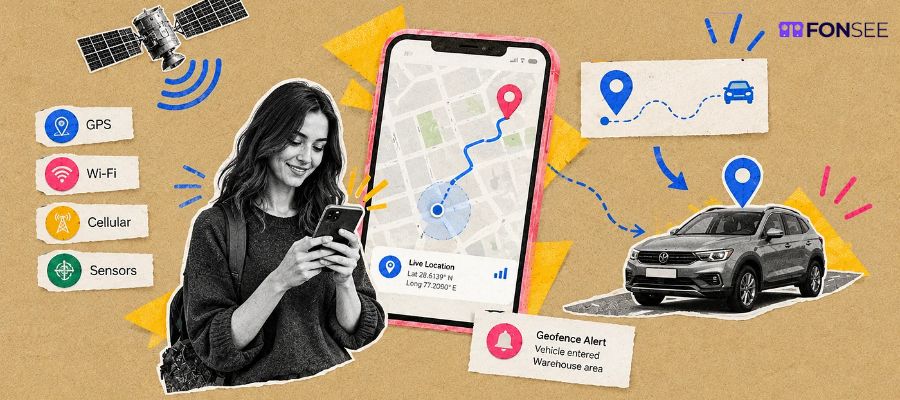
A geofencing app uses location technology to create a virtual boundary around a physical area. The boundary is usually created on a map. You select a location and define the size of the area. The app can then detect when a connected or managed device enters or leaves the zone.
This can trigger an alert.
For families, the idea is straightforward. You can create a safe zone around your home or child’s school. The app can notify you when the device crosses that boundary.
Geofencing is different from simply looking at someone’s live location. Instead of constantly checking a map, you can wait for a specific event.
Why Use Geofencing for Family Safety?
Modern families are often busy. Children go to school. Teenagers visit friends. Parents commute to work. Family members may also travel independently.
Location sharing can help families stay connected. But constantly checking someone’s location can become inconvenient.
Geofencing provides another option. You can define locations that matter to your family. The app then handles the alerting.
For example, a parent could create these zones:
- Home
- School
- Sports center
- Grandparents’ house
- Friend’s house
- After-school activity location
When a device enters or exits one of these areas, the parent can receive a notification, depending on the app and its settings.
This can reduce the need for constant location checks.
Best Geofencing Apps for Android to Keep Loved Ones Safe
FonSee
FonSee is designed for parents and families who want more than basic location sharing. Its location tools include GPS tracking, location history, and geofencing related alerts.
This allows parents to create location-based boundaries and stay informed about important movements.
For example, a parent could create a safe zone around a child’s school. The location information can then help the parent understand when the managed device arrives at or leaves the area.
FonSee also brings other parental monitoring tools into the same platform. Depending on the device and permissions available, parents can use features related to calls, messages, apps, websites, and screen activity.
This makes it useful for parents who want location awareness as part of a broader digital safety setup.
Another advantage is convenience. Instead of relying on separate apps for different types of parental controls, families can manage several safety features from one dashboard.
Of course, location monitoring should be used responsibly. Parents should use FonSee only on devices they own or are authorized to manage. Privacy, consent, and applicable laws should also be considered.
Life360
Life360 is one of the most recognizable names in family location sharing. The platform focuses heavily on keeping family members connected through location services.
One of its useful concepts is the ability to create places. Families can define important locations and receive notifications related to members arriving at or leaving those places.
This makes it useful for everyday routines. A parent might create a home location and a school location. Instead of opening a map repeatedly, they can rely on place-based notifications.
Life360 may be a good fit for families whose main requirement is location sharing and family coordination.
However, features and limits can vary by plan. It is worth checking the current offering before choosing a subscription.
TheOneSpy
TheOneSpy takes a broader approach to device monitoring. Its location features include GPS tracking, location history, and geofencing related functionality. These tools can help parents stay aware of where a managed device has been and whether it enters or leaves predefined areas.
The platform also includes other monitoring and parental-control features. Depending on the operating system and permissions, these can include call and message monitoring, app and website controls, screenshots, screen activity, and other device-related information.
This makes TheOneSpy more suitable for parents who want location monitoring alongside broader digital activity management.
Families should always check device compatibility before using any monitoring platform. Android permissions and operating-system restrictions can affect how individual features work.
Bark
Bark is widely associated with digital safety and parental controls. Its approach is broader than simply showing a child’s location.
The platform focuses on helping parents identify potential online safety concerns. Depending on the product and supported features, parents can also use location-related tools to stay connected with their children.
This can be useful for families that want to combine digital safety with location awareness.
Parents may find this approach helpful because online and physical safety often overlap. A child’s location is only one part of the bigger picture.
Qustodio
Qustodio is a popular parental control platform. It focuses on helping parents manage children’s digital activity. Its features can include screen time management, web filtering, app controls, activity monitoring, and location related tools.
For parents, this combination can be useful. You may want to know where your child is. But you may also want to understand how they use their phone.
Qustodio provides a broader parental-control environment rather than focusing only on GPS tracking.
As with other apps, parents should review current Android compatibility and feature availability before selecting a plan.
AllGeo
AllGeo takes a different approach. It is primarily designed for businesses and workforce management.
Its geofencing technology can help businesses create virtual boundaries around job sites and other locations. Location events can then be used for workforce processes such as attendance and field operations.
That makes AllGeo less relevant for parents. Still, it demonstrates how geofencing can be used beyond family safety.
For businesses with employees working in different locations, geofencing can help automate location-based processes.
OnTheClock
OnTheClock is mainly an employee time-tracking solution. Its purpose is different from a family safety app.
Businesses can use employee time and attendance tools to manage working hours. Location-related capabilities can also support workplace use cases.
Parents looking for a family geofencing app would generally have more suitable options.
However, OnTheClock is worth mentioning when discussing the wider use of geofencing technology.
Hubstaff
Hubstaff is another workforce management platform. It combines time tracking with tools for managing distributed and field-based teams.
Location information can be useful for businesses that need to understand where field workers are operating.
Like AllGeo and OnTheClock, Hubstaff is not primarily a family safety solution.
Its inclusion highlights an important point. Geofencing is not limited to parental controls. The same basic technology can support family, business, logistics, and workforce applications.
Key Features to Look for in an Android Geofencing App
Choosing a geofencing app is not only about finding one that supports location alerts.
You should consider several factors.
Accurate Location Tracking
A geofencing app needs reliable location information. If location data is inaccurate, alerts may not be useful.
GPS accuracy can vary depending on the device, signal, permissions, network conditions, and physical environment.
Custom Safe Zones
Look for an app that lets you define your own locations. Parents may want separate zones for home, school, sports activities, and other regular destinations. The ability to adjust the size of a geofence can also be useful.
Arrival and Departure Alerts
Notifications are one of the main reasons to use geofencing. A useful app should make it easy to understand what happened.
For example, an alert might tell you that a managed device entered the school zone or left the home zone.
Location History
Some families want more than instant alerts. Location history can provide context about previous movements. This may be useful when reviewing a child’s routine or checking whether they reached an expected destination.
Android Compatibility
Not every feature works the same way on every Android device. Android versions, manufacturer settings, battery optimization, permissions, and background activity restrictions can affect location features.
Always check compatibility before installing an app.
Privacy Controls
Location data is sensitive. A good app should make its data practices clear.
Parents should understand what information is collected and how it is handled.
Geofencing vs. Real-Time GPS Tracking
Geofencing and GPS tracking work together, but they serve different purposes. GPS location tracking apps can show where a device is currently located. Geofencing focuses on specific areas and events.
For example, real-time tracking might show that your child’s phone is moving along a particular road.
A geofence can simply tell you that the phone has entered the school area.
Both can be useful.
For everyday family routines, geofencing can be less demanding. You do not need to keep checking a map. The app can notify you when something important happens.
Examples of Geofencing for Parents
There are many ways parents can use geofencing.
School Arrival
Create a geofence around the school. An arrival alert can provide reassurance that your child reached the location.
Leaving Home
A home geofence can notify you when a child’s device leaves the area. It can be useful for younger children who have a regular routine.
After-School Activities
Parents can create zones around sports centers, tutoring locations, or other activities. This can make it easier to keep track of scheduled routines.
Family Travel
Temporary geofences can also be useful during trips. Families can create zones around hotels, airports, attractions, or meeting points.
Are Geofencing Apps Safe?
Geofencing technology itself is not inherently unsafe. The important issue is how location information is collected and used.
Parents should choose reputable services and review their privacy policies. They should also use monitoring tools responsibly.
A child’s safety is the main goal. Monitoring should not become an excuse for unnecessary surveillance.
Use these tools on devices you own or have permission to manage. Be transparent when appropriate, especially as children grow older and become more independent.
It is also worth limiting monitoring to information that serves a genuine safety purpose.
How Accurate Are Geofencing Apps?
Geofencing is not always perfectly precise. GPS signals can fluctuate.
Buildings, poor reception, battery-saving settings, and network conditions can all affect location accuracy.
The size of the geofence also matters. A very small boundary may produce more false alerts than a reasonably sized zone.
For this reason, parents should treat geofencing alerts as useful indicators rather than absolute proof of someone’s exact position.
Can Geofencing Apps Save Battery?
Location services can use battery power. Modern Android devices have several systems designed to manage background activity and battery consumption. These can affect how location apps operate.
Parents should therefore look for an app that balances useful location updates with reasonable battery usage.
Keeping the phone’s location permission and battery settings configured correctly can also help.
Which Geofencing App Is Best for Family Safety?
The right choice depends on what your family needs. FonSee is worth considering if you want location monitoring and geofencing alongside advanced parental monitoring tools.
Life360 may suit families that mainly want location sharing and place-based alerts.
TheOneSpy can be considered by parents looking for a wider device-monitoring solution that includes location features.
Bark focuses strongly on digital safety and parental controls, with location features forming part of its wider approach.
Qustodio is another option for families looking for parental controls, screen-time management, web filtering, and location-related features.
AllGeo, OnTheClock, and Hubstaff are more appropriate for business and workforce use cases.
Before making a decision, compare the features, Android compatibility, pricing, privacy practices, and monitoring requirements of each service.
Why FonSee Can Be a Practical Choice for Parents
Some parents only need a family locator. Others want a more complete view of their child’s digital and physical safety.
This is where FonSee can be useful.
It combines location related features with advanced parental monitoring tools. Parents can use GPS information and geofencing while also managing other aspects of a child’s device activity.
That can be more convenient than switching between several different apps.
FonSee is especially worth considering when location alerts are only one part of your family’s safety needs.
As always, monitoring should be limited to devices you own or are authorized to manage. Parents should also follow applicable laws and respect reasonable privacy expectations.
Final Thoughts
Geofencing has made location monitoring more practical. Parents do not always need to watch a live map. Sometimes, they simply need to know when a child arrives at school or leaves a familiar location.
That is where geofencing can make a difference.
Apps such as FonSee, Life360, TheOneSpy, Bark, and Qustodio offer different approaches to family and device safety. Meanwhile, platforms such as AllGeo, OnTheClock, and Hubstaff show how geofencing can also be used in the workplace.
For families, the best app is the one that fits their routine.
Look for reliable location features, useful alerts, Android compatibility, privacy controls, and simple management.
If you want to combine geofencing with broader parental monitoring, FonSee is worth exploring. It can help parents stay aware of important location events while bringing other device safety tools into one place.
Explore FonSee and see whether its location and parental monitoring features fit your family’s safety needs.
Frequently Asked Questions About Geofencing Apps
What is the best geofencing app for Android?
The best app depends on your needs. FonSee, Life360, TheOneSpy, Bark, and Qustodio are options worth comparing for family safety. Check their current Android compatibility and available location features before choosing one.
Can geofencing apps notify me when my child arrives at school?
Yes. Apps with geofencing or place-based alerts can notify you when a managed device enters a predefined school zone. The exact feature depends on the app and device settings.
Can I create a geofence around my home?
Yes. Many location and family safety apps allow users to create custom zones around places such as homes, schools, workplaces, and other important locations.
Do geofencing apps work on all Android phones?
Not necessarily. Features can depend on the Android version, device manufacturer, location permissions, battery settings, and background activity restrictions.
Are geofencing apps accurate?
They can be useful, but they are not perfect. GPS accuracy can change because of buildings, signal conditions, network availability, device settings, and the size of the geofence.
Can geofencing apps drain a phone battery?
Location services can consume additional battery power. The impact depends on the app, device, update frequency, Android settings, and other factors.
Is geofencing useful for child safety?
Yes. Parents can use geofences around important locations such as home, school, and activity centers. Arrival and departure alerts can provide useful safety information without requiring constant map checks.
Is it legal to use a geofencing app to monitor a child?
Laws and expectations vary by location and circumstances. Parents should use monitoring tools only on devices they own or are authorized to manage and should follow applicable privacy and consent requirements.
Can FonSee be used for location monitoring?
FonSee includes location related features such as GPS tracking, location history, and geofencing capabilities. Parents can use these tools as part of a broader device safety and monitoring setup, subject to device compatibility and required permissions.