

Have you ever opened WhatsApp and noticed that someone deleted a message, and wondered what was removed? You’re not alone. Millions of users search for ways to view deleted WhatsApp messages every month, especially when an important text, photo, or voice note disappears before they can read it.
You can recover or view deleted WhatsApp messages, depending on your device and whether you captured them before removal. Android users may be able to use Notification History or local backups, while iPhone users typically rely on iCloud backups. In some cases, WhatsApp monitoring software installed on a device you own or manage with consent can preserve message activity before deletion.
This guide explains how WhatsApp message deletion works, which recovery methods actually work, and the limitations you should know before trying to restore deleted chats.
What is the Meaning of Deleted Messages on WhatsApp?
WhatsApp removes the message from the chat once a user deletes it. In plain terms, this means that the individual who sent the message chose to delete it using the Delete for Everyone option.
Then, after that, you cannot see the original message. This may occur with any form of content, that is, text, photos, videos, voice notes, or files. The only thing in the chat is the deletion notice, and the content is missing.
Can You Really Read Deleted WhatsApp Messages?
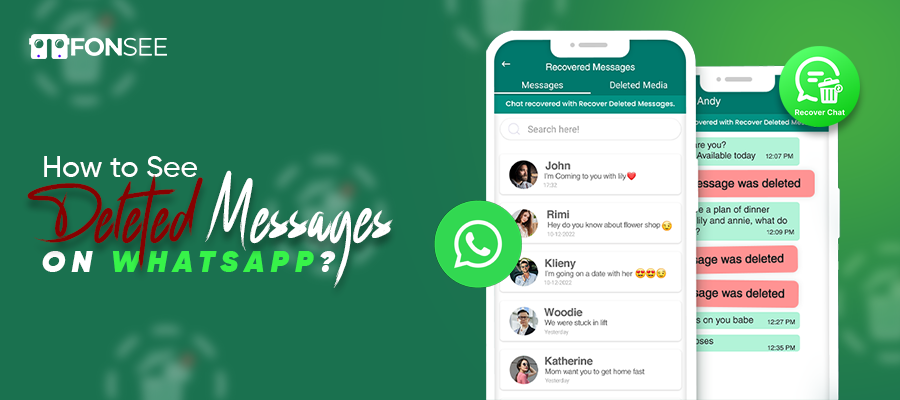
Yes — but only in certain situations.
When someone uses Delete for Everyone, WhatsApp removes the message from the chat for all participants. However, copies of that message may still exist in:
- Android notification history
- Google Drive backups
- Local device backups
- iCloud backups on iPhone
- Previously synced WhatsApp Web sessions
- WhatsApp monitoring solutions that captured the message before deletion
How WhatsApp Delete for Everyone Works
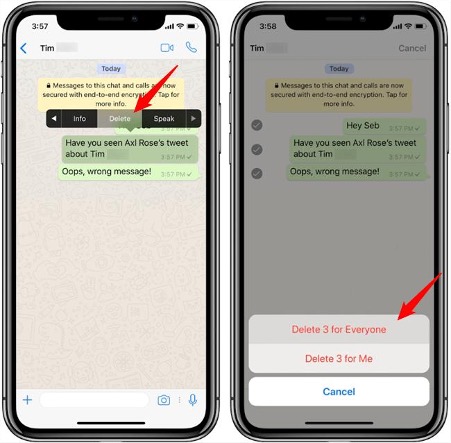
When a sender deletes a message for everyone, WhatsApp displays a deletion notice to replace the original content. The message disappears from the chat, but notification previews, cached data, or backups created before deletion may still contain a copy.
Important: If a backup was created after the message was removed, that backup usually will not contain the original message.
Method 1: Use Notification History on Android
The WhatsApp Notification History system log contains saved previews, and deleted messages can be read by opening Notification History. On the downside, it doesn’t offer text notifications; you’ll only see a brief view of the content on your wrist, and it’s only compatible with Android 11 or later. Still, it’s a quick and free way for many users to view deleted messages.
Best for: Messages removed within the last few hours.
Requirements: Android 11 or later and Notification History enabled before the message was deleted.
Steps
- Open Settings.
- Go to Notifications.
- Tap Notification History.
- Turn the feature on if it is disabled.
- Scroll through recent WhatsApp notifications to find the deleted message.
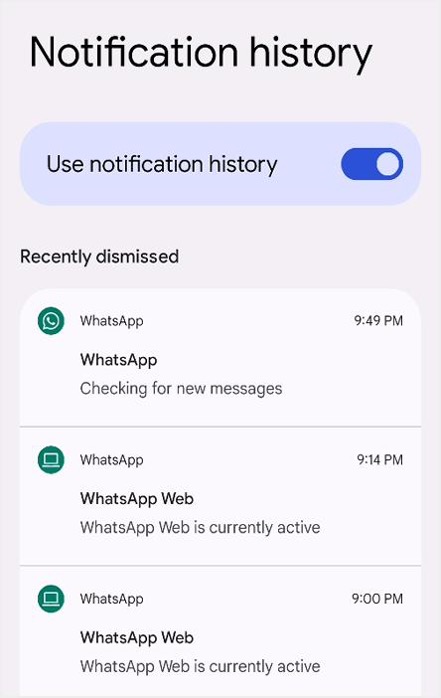
Tip: Notification History usually stores only the text shown in the notification. Photos, videos, and many voice messages cannot be recovered this way.
Method 2: Restore a Google Drive Backup
Android users have WhatsApp cloud backups stored in Google Drive, which enable them to view deleted messages in older backups. To restore WhatsApp, tap ” Appear again, and choose Drive backup.
Your conversation history will be repopulated with the previously removed messages. As with any other backup mechanism, restore is restricted to messages generated before the backup date. It is an appropriate choice if you want to recover WhatsApp messages and do not mind returning to a previous chat history.
Best for: Recovering older deleted chats on Android.
Before You Start
Check whether WhatsApp backups are enabled:
WhatsApp → Settings → Chats → Chat backup
If a backup exists from before the message was removed, you may be able to restore it.
Steps
- Uninstall WhatsApp.
- Reinstall it from the Play Store.
- Verify your phone number.
- Tap Restore when prompted.
- Wait for chats and media to download.
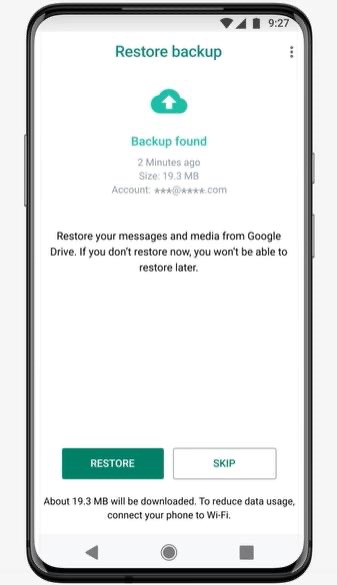
Important: Messages received after the backup date may disappear when you restore an older backup. Export important chats first.
Method 3: Restore a Local Android Backup
WhatsApp automatically saves local backups of your chats on your Android device. These backups are typically created once every day and stored in your phone’s internal storage. Restoring a local backup can help recover deleted WhatsApp messages, but only if the backup was created before the messages were removed. Restore from the WhatsApp backup, but it can only read the messages that were there when the backup was created.
Unlike cloud backups, local backups remain on your device, making them useful when you don’t have an internet connection or haven’t enabled Google Drive backup.
However, restoring a local backup requires uninstalling and reinstalling WhatsApp, and any messages received after the backup was created will be overwritten and lost unless they are backed up elsewhere. Many Android devices create local WhatsApp backups automatically.
Steps
- Open your file manager.
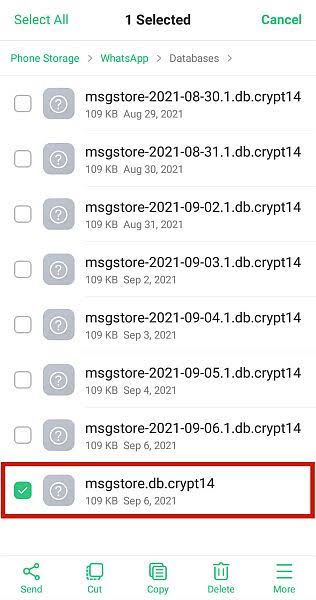
- Navigate to Android/media/com.whatsapp/WhatsApp/Databases.
- Locate a backup file dated before the deletion.
- Rename it to msgstore.db.crypt14 (or the current WhatsApp format).
- If you want to restore an older backup, rename the desired backup file to msgstore.db.crypt14 after saving a copy of the current one.
- Reinstall WhatsApp and restore from local storage.
This method is often overlooked but can be extremely effective when cloud backups are unavailable.
Method 4: Recover Deleted Messages on iPhone
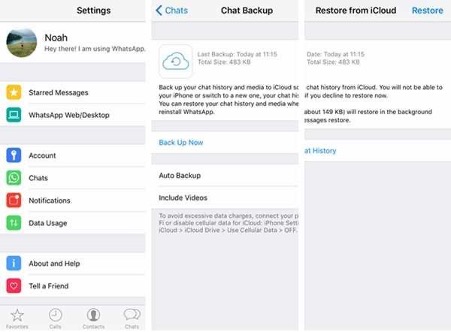
If you’re an iPhone user and have iCloud Backup enabled for WhatsApp, you may be able to recover deleted messages by restoring your most recent backup. WhatsApp backups are among the most reliable recovery methods because they store chat history, photos, videos, and documents in iCloud.
Keep in mind that this method restores only messages the backup included. If you delete a message before the backup is created, you cannot recover it. A newer backup handles messages received after the backup date; if not, the older backup handles them.
Before You Begin
Verify the following requirements before restoring your WhatsApp chats:
- Enough iCloud storage: Ensure your iCloud account has sufficient free space. The backup size depends on your chat history and media files. A large backup may require several gigabytes of available storage.
- Same Apple ID: You must be signed in with the same Apple ID that was used to create the WhatsApp backup.
- Same phone number: WhatsApp can only restore backups linked to the same phone number used during the backup.
- iCloud Drive enabled: Go to Settings > [Your Name] > iCloud and make sure iCloud Drive is turned on.
- WhatsApp enabled in iCloud: In the iCloud settings, verify that WhatsApp is allowed to use iCloud for backups.
- Recent backup available: Open WhatsApp > Settings > Chats > Chat Backup to check the date and time of your latest backup.
How to Restore WhatsApp Messages from iCloud
- Open WhatsApp and confirm that an iCloud backup is available under Settings > Chats > Chat Backup.
- Delete WhatsApp from your iPhone by tapping and holding the app icon and selecting Remove App.
- Download and reinstall WhatsApp from the App Store.
- Open WhatsApp and verify your phone number using the same number associated with the backup.
- When prompted, tap Restore Chat History.
- Wait for the restoration process to finish. Depending on the size of your backup and your internet connection, this may take several minutes.
- Once complete, your chats, photos, videos, and other backed-up data will reappear in WhatsApp.
Best for: iPhone users with iCloud backups enabled.
Note: iPhone does not provide a built-in Notification History feature like Android, so backups are usually the primary recovery option.
Method 5: Check WhatsApp Web
If WhatsApp Web was open when the message arrived, the deleted content may still appear temporarily in the browser session.
Try this before refreshing the page:
- Open the existing WhatsApp Web tab.
- Search the conversation immediately.
- Avoid refreshing until you check for the deleted message.
This method is time-sensitive and does not work consistently.
Method 6: Use WhatsApp Monitoring Solution
For parents monitoring their children’s devices or businesses managing company-owned phones with proper consent, a monitoring solution can preserve message activity before deletion occurs.
FonSee WhatsApp Tracker
FonSee WhatsApp monitoring is a parental control and device management tool to help users supervise WhatsApp usage on the devices they own or have proper consent for. It does not hack or break the security. FonSee protects children from pornography and restricts the use of company-owned devices. The tool can display incoming and outgoing messages, monitor shared media, and even read deleted messages sent or received, provided the required permissions are in place. FonSee refreshes monitored data in real-time and ensures easy-to-use, secure dashboards for transparent WhatsApp monitoring responsibly.
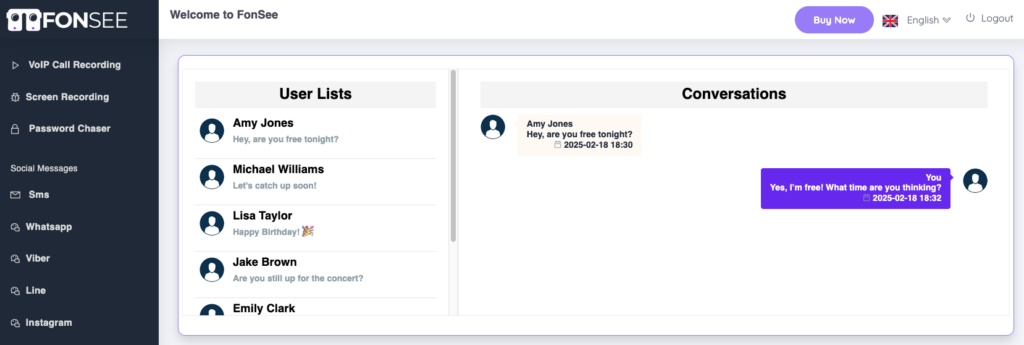
FonSee WhatsApp monitoring is the best choice for accessing deleted WhatsApp messages, as it can record the device’s lifetime without backups or notifications. As soon as the device receives a specific message, FonSee will archive it automatically in your own dashboard.
Although the sender may have deleted the message within 10 seconds, it will still appear in your FonSee account. It is a real-time capture system that is more accurate than the notification- or dump-based methods. FonSee too keeps erased photos, videos, documents, and voice notes, which are unavailable in the notification history or backups. For parents, employers, and those who spy, FonSee provides a detailed history of WhatsApp activity, including every deleted message.
Complete Guide to Check Removed Messages on WhatsApp
FonSee provides a safe, secure service that runs on the device backend. It monitors VoIP call logs, text messages, records sent or received media files, and transmits the information to your real-time dashboard. If the sender deletes the message, FonSee preserves the original messages at a secure spot. FonSee makes the text and multimedia information available, preventing loss. FonSee operates without backups or notification previews. Compared with traditional methods, FonSee records every conversation detail and provides a complete chat history.
Advantages of FonSee to Check Deleted WhatsApp Messages
You can take many advantages with the best parental control, such as FonSee. Let’s keep an eye on the advantages of FonSee, which will be the best for WhatsApp tracking, especially for deleted messages.
Take Screenshot Chat
FonSee quickly captures every moment on WhatsApp across the targeted smart devices. This ensures the app stores deleted chats securely, even when the sender deletes them from your chats menu. You don’t have to depend on notifications or backups to see lost messages. It delivers a complete, precise record of all discussions in real time.
Hidden Media Preservation
When the sender uploads the recording in the disappearing form, FonSee keeps a secure copy of deleted media. You get a full view of the talks without skipping any crucial files. Even if the sender removed the media, you still see it in the control panel.
Universal Device Compatibility
FonSee operates smoothly on Android devices. It works well on all of them. This makes it a suitable choice for different users and device types.
Dashboard for Smart Activities
The dashboard displays all WhatsApp activity in a user-friendly. Users can access deleted chats at any time, without installing any additional software.
The dashboard sorts conversations by contact and date to make browsing easier. The dashboard receives real-time updates, so users will always see the most up-to-date status of their WhatsApp usage.
Recover Messages with No Risk
With FonSee, you can access your chat history without any uninstallation or WhatsApp backup restoration. That is to say that you will not lose any information in your current conversations and will not receive error messages. Users can still access the deleted messages, but at the same time have the rest of their chats without compromising on the rest of their message history.
Tips to Avoid Losing Important WhatsApp Messages
Recovering deleted WhatsApp messages isn’t always possible, especially if no backup exists. The best approach is to protect your chats before data loss occurs.
By enabling automatic backups, maintaining sufficient cloud storage, and regularly checking your backup settings, you can significantly increase your chances of restoring important conversations when needed.
Tips to Include Under This Heading
- Enable daily WhatsApp backups to Google Drive or iCloud.
- Keep enough storage space available for backups.
- Turn on iCloud Drive or Google Drive sync.
- Avoid uninstalling WhatsApp without confirming a recent backup.
- Back up important chats before switching phones.
- Archive important conversations instead of deleting them.
- Regularly verify that backups are completing successfully.
Why FonSee is the Best Choice for Reading WhatsApp Deleted Messages
FonSee is a user-friendly interface, which means one can easily read deleted WhatsApp messages within it, even if they are not technical users. It not only displays deleted texts but can also restore images, videos, voice notes, and documents.
The actual strength of FonSee in its accuracy, privacy, and speed. Your data will be absolutely safe and processed locally, without exposure to any third parties. FonSee restores all your lost messages and chats.
Final Thoughts
Basically, everyone wants to get out of this curiosity. So the main question is: how can we see deleted messages on WhatsApp? But you don’t need to worry about parents or employers for the kids’ protection.
A backup made before the deletion occurred remains the most reliable way to recover deleted WhatsApp messages. For recent Android messages, Notification History is often the fastest free solution. iPhone users generally have the best results with iCloud backup restoration.
If you are a parent supervising a child’s device or a business managing company-owned phones with proper consent, an authorized monitoring solution such as FonSee can help preserve message activity before deletion occurs.
Before recovery, verify your backup date; that date often determines whether you can restore a deleted WhatsApp message.
FonSee captures every moment that happens on WhatsApp, including deleted messages. It provides the invisible eyes on the chat view that the user hides. You can go to the FonSee official website, then try the FonSee monitoring tool.
Believing any random app that claims to be good at monitoring, but in fact! They are just committing fraud against innocent folks. So, believe in the powerful monitoring tool FonSee, which will protect your kid’s privacy.
Frequently Asked Questions
Can I recover deleted WhatsApp messages without a backup?
Sometimes. Android users can recover recent text messages through Notification History if they enabled it before deletion. Without backups or notification records, recovery becomes much less likely.
Can I recover deleted photos and videos?
Recovery depends on how you backed up the media before you deleted it. If you backed up your WhatsApp chats to Google Drive, iCloud, or a local backup, you can restore those files.
Keep in mind that Android Notification History only records notification text. Android Notification History cannot recover media files such as photos, videos, GIFs, or voice messages because it does not store these files in notification logs.
If the monitored device captured multimedia before deletion, FonSee can display recorded photos, videos, and other media collected before deletion. You must install and configure the app on the device before removing the content.
Do third-party recovery apps work?
Some legitimate tools can help in specific situations, but many apps claiming “100% recovery” are misleading. Be cautious about installing unknown APK files.
Can someone delete a message permanently?
A message can be removed from the active chat, but copies may still exist in backups, notifications, or previously captured records created before deletion.