

Have you ever opened Snapchat and realized that an important conversation has disappeared? If you want to know how to see deleted Snapchat messages, there are several methods worth trying. You can check saved conversations, download your Snapchat account data, review notification history, or look for existing device backups. While not every deleted message can be recovered, these methods may help you find messages or information that are still available.
The good news is that some Snapchat messages may still be accessible. You can check your saved conversations, request your account data, review notification history, or look for an existing device backup.
However, there is something important to understand. Not every deleted Snapchat message can be recovered. Snapchat is designed to make most conversations disappear after they have been viewed or expire. Once the content has been permanently deleted, there may be no way to bring it back.
In this guide, we will explain how to see deleted Snapchat messages on Android and iPhone. We will also cover what recovery methods actually work, which ones have limitations, and how you can avoid losing important conversations in the future.
Can You See Deleted Messages on Snapchat?
Yes, sometimes. But it depends on how the message disappeared and whether a copy still exists.
For example, a conversation may be missing because its messages expired automatically. You may have cleared a conversation from your chat feed without deleting the saved messages. Alternatively, someone may have manually deleted a message.
These situations are different.
If a message was saved in the conversation, it may still be available. If you have a notification preview or an existing backup, you might find part of the original content there.
However, if Snapchat has permanently deleted an unsaved message, you should not expect to recover its complete text.
Snapchat also allows users to remove messages they have sent. The platform makes an effort to remove deleted content from its servers and other participants’ devices, although this may not always happen immediately.
Therefore, recovery depends on the message type, deletion method, device settings, and available backups.
How to See Deleted Snapchat Messages: 7 Methods
Before downloading recovery applications, start with the methods that are already available on your phone or Snapchat account.
1. Download Your Snapchat Data
One of the first methods to try is Snapchat’s official My Data feature.
Snapchat allows users to request a copy of certain account information. The downloadable archive may include saved chat history, Snap history, account activity, friends, and other records.
It is worth checking if you have lost an important conversation.
Follow these steps:
- Open a web browser on your phone or computer.
- Visit https://accounts.snapchat.com/.
- Log in using your Snapchat account.
- Select the My Data option.
- Choose the information you want to include in your download.
- Select a date range or request all available data.
- Confirm your email address.
- Submit your request.
- Wait for Snapchat to prepare your archive.
- Download the ZIP file using the link provided by Snapchat.
After downloading the file, extract it and open the available HTML or JSON files.
Look for the saved chat history and other relevant records.
Can this method recover permanently deleted messages?
Not necessarily. Snapchat provides access to data it retains and makes available for download. It does not promise to restore every expired or deleted conversation.
You may find saved messages or useful account records, but do not expect a complete transcript of every conversation you have ever had.
This is an official and safe starting point because you are requesting your own account information directly from Snapchat.
2. Check Your Saved Snapchat Conversations
Sometimes, messages are not actually deleted. They may simply be hidden among older conversations.
Snapchat allows users to save individual messages in a chat. Saved messages remain visible in the conversation until someone removes them.
Here is how to check:
- Open Snapchat.
- Swipe right to access the Chat screen.
- Find the person whose messages you want to review.
- Open the conversation.
- Scroll through the available messages.
- Look for messages with a gray background.
Gray-highlighted messages are generally saved in the chat.
You can also check whether the conversation contains saved photos, videos, or other media.
Remember that clearing a conversation from your chat feed is not the same as deleting its saved messages.
If the message was saved before disappearing, this method may help you find it without installing another application.
3. Check Notification History on Android
Did you receive a Snapchat message notification before the message disappeared?
If notification history was already enabled on your Android phone, you might find a preview of the message there.
Some Android devices keep a record of recent notifications. Depending on the phone manufacturer and Android version, this history may include notification text.
To check:
- Open your Android phone’s Settings.
- Search for Notification History.
- Open the Notification History option.
- Check whether notification history is enabled.
- Review the available notifications.
- Look for Snapchat message previews.
On some Android devices, you can also find this option under Settings > Notifications > Notification History.
There are a few limitations.
First, notification history must have been enabled before the message arrived. Second, Snapchat notification previews must have been allowed. Third, you may only see part of the message rather than the entire conversation.
If the sender’s message was hidden by your notification settings, the history may not contain its text.
This method is useful for checking messages that appeared in notifications. It does not recover the original Snapchat conversation.
4. Check iPhone Notifications and Backups
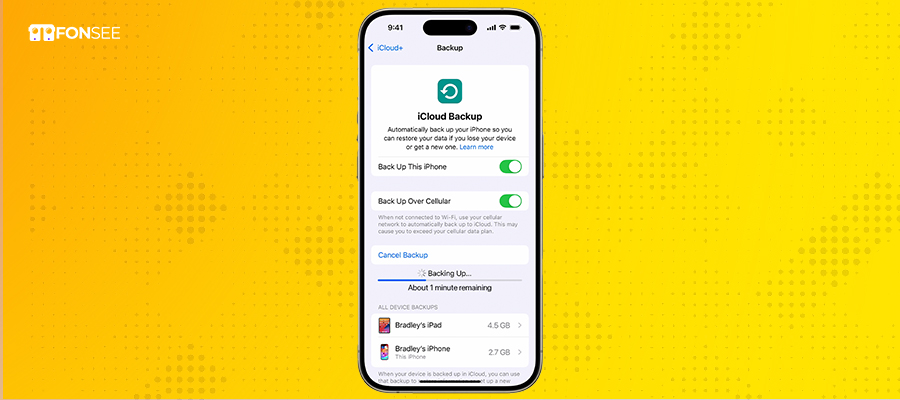
iPhone users have fewer options for accessing historical notification content.
iOS does not provide an Android-style notification history that stores every past notification indefinitely.
However, you can check your Notification Center if the notification is still available.
Follow these steps:
- Wake your iPhone.
- Swipe down from the top of the screen to open Notification Center.
- Look through recent notifications.
- Find any Snapchat message previews that are still visible.
If the notification has already been cleared, this method may not help.
What about iCloud backups?
If you regularly back up your iPhone, you can check whether an older backup is available.
Go to Settings, tap your Apple Account, select iCloud, and review your backup information.
You can also check whether you have an archived backup on a Mac or computer.
However, restoring a backup is not a guaranteed Snapchat message recovery method. Snapchat conversations are managed through its own servers, and an iPhone backup may not contain the original message content.
Restoring an entire iPhone backup can also replace newer data with older information.
Before restoring anything, create a current backup and understand what information could be lost.
5. Check Snapchat Memories
Sometimes, users confuse deleted Snapchat messages with missing photos or videos.
If you are looking for previously saved Snaps, Memories is worth checking.
Snapchat Memories is designed to store Snaps and Stories that users choose to save.
To check:
- Open Snapchat.
- Swipe up from the Camera screen.
- Open Memories.
- Browse the Snaps and Stories you previously saved.
- Check your saved content.
You can also check the My Eyes Only section if you previously moved private Snaps there.
Keep in mind that Memories is not a deleted message recovery folder. It cannot restore a conversation that Snapchat has permanently removed.
It is useful when the missing content was a saved photo, video, or Story rather than a text message.
6. Ask the Other Person to Check Their Saved Messages
Another simple method is to contact the person you were chatting with.
If someone saved a message before it disappeared, the message may still be visible in their conversation.
Ask them to:
- Open Snapchat.
- Find your conversation.
- Check for saved messages.
- Look for any relevant photos or videos.
- Share the information with you if they are comfortable doing so.
They may be able to send a screenshot or copy the text.
This method is particularly useful when you accidentally cleared your conversation but the other participant still has a saved copy.
However, it will not help if the message was permanently deleted from both sides.
7. Try a Trusted Data Recovery Tool
Some data recovery applications claim to retrieve deleted Snapchat messages from Android devices, iPhones, or existing backups.
These tools generally work by examining accessible device files or backup data. Their capabilities depend on the device, operating system, available permissions, and whether the original information still exists.
Before paying for recovery software, check exactly what it can recover.
Ask these questions:
- Does the application support your phone model?
- Does it support your current Android or iOS version?
- Can it recover Snapchat message text, or only photos and other files?
- Does it require a computer?
- Does it require root access or other advanced permissions?
- Can you preview recoverable information before purchasing?
Be careful with applications that promise to recover every deleted Snapchat conversation.
Modern smartphones restrict access to application data. Encryption, storage management, and Snapchat’s deletion policies can make recovery difficult or impossible.
Never provide your Snapchat password to an unknown recovery service. Avoid applications that request unnecessary permissions or make unrealistic recovery promises.
How to See Deleted Snapchat Messages on Android vs. iPhone
The recovery options are not exactly the same on both platforms. Here is a quick comparison:
| Recovery Method | Android | iPhone |
| Snapchat My Data | Yes | Yes |
| Check saved conversations | Yes | Yes |
| Notification history | Available on supported devices | Limited to available notifications |
| Google or iCloud backup | Depends on available backup data | Depends on available backup data |
| Snapchat Memories | Yes | Yes |
| Ask the other participant | Yes | Yes |
| Third-party software | Device-dependent | Device-dependent |
For both platforms, Snapchat’s My Data feature is a sensible first step.
Android users can also check notification history if it was enabled beforehand. iPhone users can review existing notifications and available device backups.
Neither platform offers a guaranteed way to restore permanently deleted Snapchat messages.
How Long Does Snapchat Keep Messages?
Understanding Snapchat’s deletion settings can help explain why a conversation disappeared.
Snapchat does not use one fixed deletion period for every type of content.
According to Snapchat’s support documentation, regular one-to-one and group chats are generally set to disappear 24 hours after everyone has viewed them or 31 days after they were sent, whichever happens first.
Users can change the deletion setting for future messages.
Available options include:
- After Viewing
- 24 Hours After Viewing
- 7 Days After Viewing
- Never
Saved messages can remain in the conversation. Messages may also remain longer when someone saves, replies to, or reacts to them.
Snaps have different retention rules. For example, unopened Snaps are generally retained for up to 31 days.
These settings matter because a message that disappears automatically is not necessarily the same as a message someone manually deletes.
You can check the deletion setting for a conversation:
- Open Snapchat.
- Go to the Chat screen.
- Press and hold the friend’s name.
- Select Chat and Notification Settings.
- Tap Delete Chats.
- Review the current setting.
Anyone in the conversation can change this setting, and Snapchat displays a notification in the chat when it changes.
Use the FonSee Snapchat Parental Control
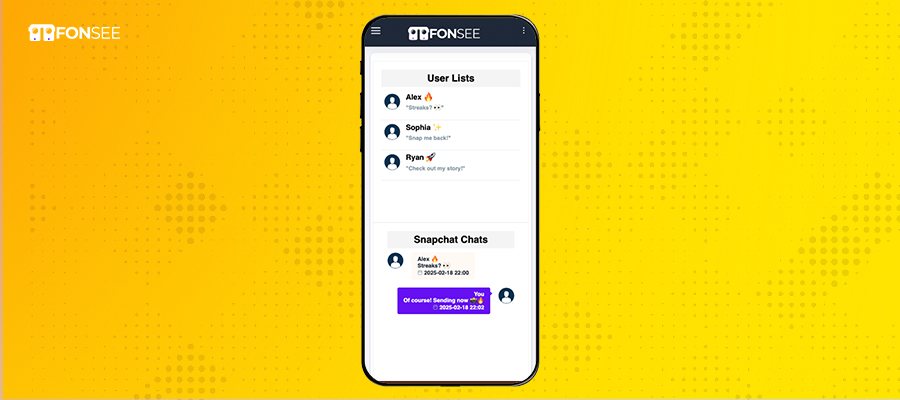
One of the most efficient methods to see deleted Snapchat message is to use the FonSee Snapchat tracker. A wide range of the best features that remotely access kid’s phones and read deleted Snapchat messages.
Once it is done!!! Silently works and gathers Snapchat messages, stories and automatically transfers to an online control panel. The users can access and capture everything happening from the device. It enables you to review your loved one’s Snapchat activities.
FonSee’s screen recording feature, which allows them to capture Snap messages and other activity before they vanish. They can get the conversation history to gain control of the kids device.
- Go to the FonSee website and subscribe to the app for Snapchat monitoring
- Open your email and get the given “credentials.”
- Now set up on the child device by getting on-time “physical access”
- Go to the online dashboard using the User ID and password.
- Here, you’re able to review all Snapchat messages, stories, “deleted chats”, and “conversation history” as well.
Can You Recover Messages Someone Deleted on Snapchat?
This is a common question, especially when someone deletes a message before you have read it. Snapchat allows users to delete messages they have sent. The platform attempts to remove the message from its servers and other participants’ devices.
If the message has already been removed, there is no official feature that allows you to reopen it.
However, there are a few situations worth checking.
Notification preview: If your phone received a notification containing the message text, part of the message may still be visible in your notification history.
Previously saved content: If you or the other participant saved the message before it was deleted, a copy may remain available.
Existing screenshots: Someone may have captured the conversation before the message disappeared.
Previously recorded activity: A legitimate monitoring solution installed and configured on a device beforehand may have recorded activity while it was available.
These options have limitations. None guarantees access to a message that was successfully deleted everywhere.
Also, respect other people’s privacy. Only access devices and accounts you own or are authorized to manage.
How to Prevent Losing Important Snapchat Messages
Recovering deleted Snapchat messages is difficult. Preventing message loss is a better approach.
Here are a few practical habits that can help.
Save important messages. Press and hold a message and select the save option when available. Saved messages remain visible in the conversation.
Change chat deletion settings. If you regularly need to refer to conversations, consider changing the setting to 24 hours, 7 days, or Never.
Save important media to Memories. Snapchat Memories can help preserve photos and videos you want to keep.
Keep notifications enabled. Notification previews may provide useful context when a message disappears, although they are not a reliable backup.
Review account data periodically. Snapchat’s My Data feature provides access to available account records.
Use appropriate parental monitoring tools. Parents managing a child’s device can consider a transparent monitoring arrangement that helps them understand online activity before temporary content disappears.
How FonSee Can Help Monitor Snapchat Activity
If you are a parent concerned about your child’s Snapchat activity, recovering deleted conversations after they disappear may not be the best solution.
A better approach is to understand device activity while it is available.
FonSee offers Snapchat parental monitoring features that can help parents review activity on a compatible Android device.
Its features include Snapchat monitoring, screen recording, and access to available device activity through an online dashboard.
With screen recording, parents can review recorded screen activity when the feature is supported and properly configured. This can help provide context about activity that might otherwise be difficult to review later.
However, there is an important distinction. FonSee should not be treated as a tool that magically restores Snapchat messages deleted before installation. It cannot guarantee recovery of permanently deleted conversations or bypass Snapchat’s server-side deletion.
To use monitoring features, parents must have appropriate authorization and physical access to the device for installation. They should also consider applicable consent, privacy, and local legal requirements.
If your goal is to understand your child’s social media activity and encourage safer digital habits, FonSee can be a good option.
Final Thoughts
Learning how to see deleted Snapchat messages can save time when you lose an important conversation.
Start with Snapchat’s My Data feature. Then check saved messages, notification history, Memories, and existing backups. You can also ask the other participant whether they still have a saved copy.
Remember that not every message can be recovered. Snapchat is designed around disappearing conversations, and permanently deleted content may no longer be available.
If you are a parent, consider focusing on prevention rather than trying to recover messages after they disappear. Understanding online activity, setting healthy boundaries, and using appropriate monitoring tools can help you support safer social media habits.
Frequently Asked Questions
Can you recover deleted Snapchat messages?
Sometimes. You may find saved messages, notification previews, or information in an existing backup. Snapchat’s My Data feature can also provide saved chat history and other account records. However, permanently deleted messages are not guaranteed to be recoverable.
How do you see deleted messages on Snapchat without downloading an app?
Start by requesting your Snapchat data through accounts.snapchat.com. You can check saved conversations, existing notifications, and messages retained by the other participant. These methods do not guarantee recovery of permanently deleted content.
How to see deleted Snapchat messages on iPhone?
Request your Snapchat data, check available notifications, review saved conversations, and look for an existing iCloud or computer backup. Remember that restoring a backup does not guarantee Snapchat message recovery.
How to see deleted Snapchat messages on Android?
Use Snapchat’s My Data feature, check saved conversations, and review Android Notification History if it was enabled before the message arrived. You can also examine existing backups and saved media.
Does Snapchat keep deleted messages?
Snapchat automatically removes most messages after they are viewed or expire. It also attempts to remove messages that users manually delete. Some account information and saved chat records may remain available through its data download feature, but this does not mean every deleted message is retained.
Can you see messages someone unsent on Snapchat?
There is no official Snapchat feature that lets you reopen a message after the sender has successfully deleted it. A notification preview, screenshot, or previously saved copy may still contain some of the original information.
Can Snapchat My Data recover deleted messages?
Snapchat My Data allows users to download available account information, including saved chat history. It does not guarantee access to unsaved, expired, or permanently deleted message content.
Can FonSee recover deleted Snapchat messages?
FonSee provides monitoring features that can help authorized parents review available Snapchat activity. Its screen recording feature can help capture activity when properly configured. It does not guarantee recovery of messages deleted before installation or permanently removed by Snapchat.
Can I recover Snapchat messages after deleting the conversation from my chat feed?
Possibly. Clearing a conversation from your chat feed is different from deleting individual messages. Check the conversation again and look for saved messages. You can also request your available Snapchat account data.
Does Snapchat notify someone when you delete a message?
Snapchat generally displays a notice in the conversation when a message is deleted. The other participant may therefore see that a message was removed, even if they cannot access its original contents.